
What AI Automation Actually Looks Like in Practice: 2 Workflows We Automated Ourselves
Artificial Intelligence | Office Technology
Most conversations about artificial intelligence in business focus on capability. What can the model do?
A more useful question for an operations leader is narrower:
Which specific pieces of repetitive work can be handed off?
What does the handoff cost?
What still needs a person?
Before recommending AI automation to a client, we ran it on our own operation. Two internal workflows are now automated in production, and the results are measurable.
Over the past several months, LDI Connect answered those questions on our own workflows first. We selected two internal processes that were consuming meaningful staff time, rebuilt them with cloud automation and AI extraction, and measured what changed. Both are running in production today.
Here’s what we automated, what the numbers look like, where the systems still fall short, and what transfers to other organizations.
1. Know what makes a workflow a good candidate
The strongest candidates share a recognizable shape. They are high-volume, document-heavy, and repetitive in structure but variable in format. The work requires judgment to set up and almost none to repeat.
Practical signals that a workflow may be worth automating:
- Recurring cadence
- Source data that already exists in a system
- Format variation across senders
- Single-person dependency
- No visibility into exceptions
The same task happens daily, weekly or monthly rather than occasionally. Information is being exported, retyped or reformatted rather than created. Documents arrive from many senders in inconsistent layouts, which is why simple rules have not solved it already. One person holds the institutional knowledge, and their absence creates a backlog. And nobody can say with confidence what got missed last month.
Both of the workflows below matched most of that list. Neither was a technology problem that had gone unnoticed. Both were processes that worked, but only because someone spent hours a week making them work.
2. Automate the intake nobody wants to own
Meter readings arrived in a shared mailbox as inconsistent PDF and spreadsheet attachments, and one staff member routed every one by hand.
The manual process
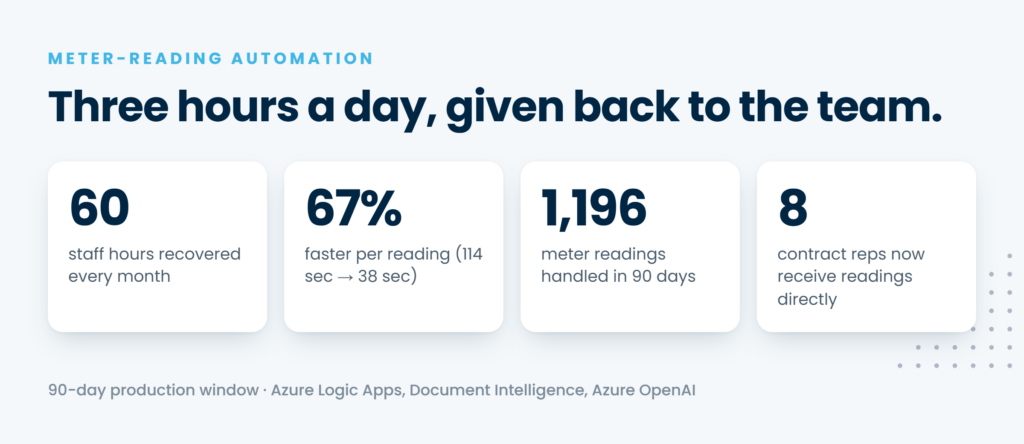
Equipment suppliers send meter readings to a shared inbox. Each message had to be opened, scanned for the relevant meter serial number, matched against customer records, and forwarded to the contract representative who bills that account. The volume made it a daily obligation rather than an occasional task, and it consumed roughly three hours of one person’s day, every business day, or about 60 hours a month.
What the automation does
The automation ingests the mailbox, extracts the serial number from the attachment, matches it to the responsible contract representative, and forwards the reading automatically. Documents that require optical character recognition are processed for text before extraction, so scanned files move through the same path as digital ones.
Why the first version stalled
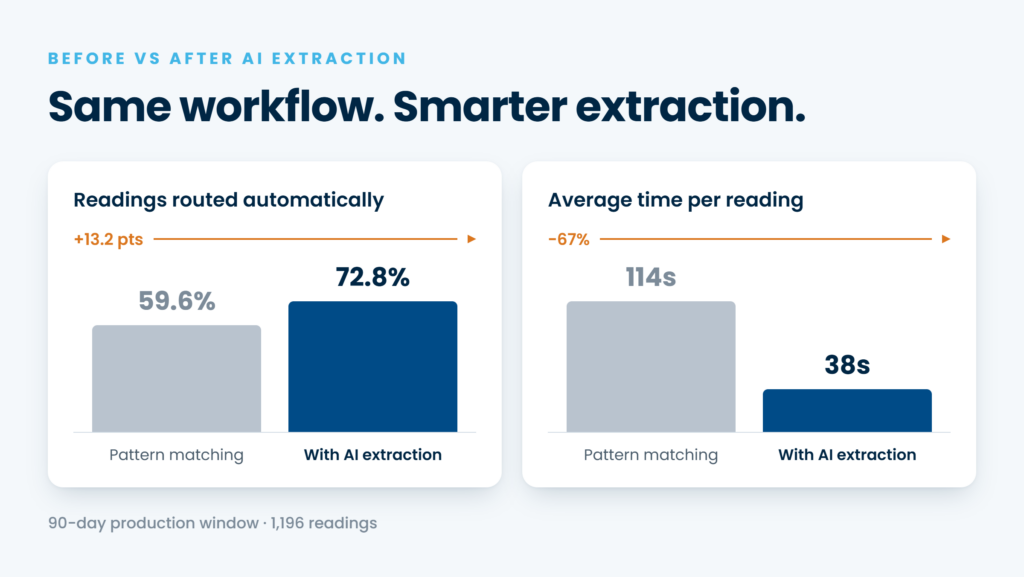
The first version used pattern matching alone and reached a ceiling quickly. It succeeded on 59.6 percent of emails and averaged 114 seconds each. Suppliers vary their layouts too much for fixed patterns to hold, and scanned documents were effectively unreadable. Replacing the extraction layer with document intelligence and an AI model that locates values by column label and surrounding context moved the same pipeline to 72.8 percent success at 38 seconds per email, a 67 percent reduction in processing time.
Results in production
Across a 90-day production window, the system processed 1,196 readings. Approximately three out of four now complete in under a minute. Cloud costs to operate it run between $80 and $200 a month.
3. Automate the report someone rebuilds every week
A weekly operational service review that took two to three hours per client to assemble by hand is now drafted in under three minutes.
The manual process
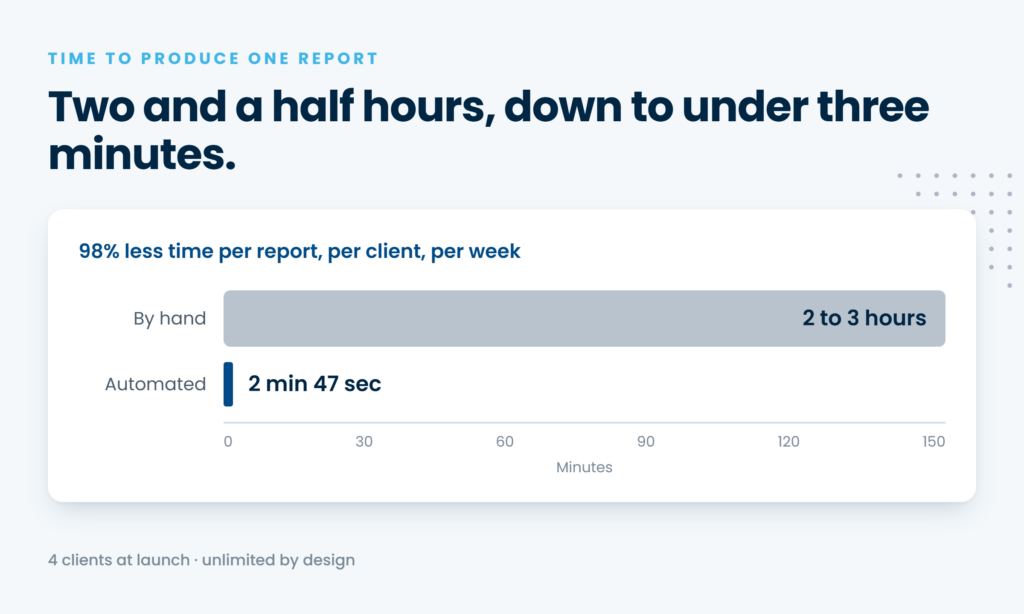
Each week, Managed IT clients receive an operational service review summarizing their support ticket activity: what came in, what was resolved, how quickly, and what remains open. Producing it manually meant exporting ticket data from our service platform, reviewing every ticket, writing narrative summaries, populating a template, verifying the formatting, and sending the document. For a client with 20 or more tickets, that was two to three hours of senior staff time per report, every week. Each additional client added hours with no economies of scale.
What the automation does
The automated pipeline detects the ticket export when it arrives, parses it regardless of whether it came through as a PDF or a spreadsheet, calculates the metrics, generates the narrative, renders the branded template, and emails a finished draft to the reviewer. Average end-to-end processing time is two minutes and 47 seconds.
Results in production
The system launched with four clients and returns roughly 12 hours of senior capacity each week. Because the process is identical for every client, adding another requires no configuration and no additional cost.
One capability worth noting: each report carries forward context from the prior period. Open action items and earlier recommendations are referenced automatically rather than tracked by hand, which makes multi-period patterns easier to surface.
4. Keep the AI away from the arithmetic
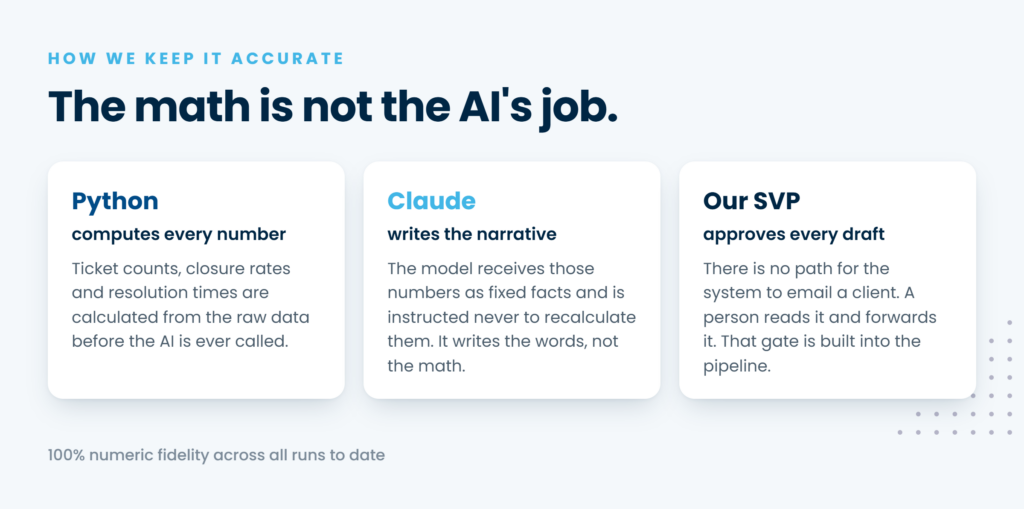
Separate the calculation from the writing. In our reporting pipeline, every number is computed in code, and the AI model writes narrative only.
This was the single most important design decision in the project, and it is the one we would repeat first in any client engagement.
Calculate first, then write
Ticket counts, closure rates, resolution times and distribution figures are all calculated from the raw source data before the model is called. Those figures are then passed to the model as fixed facts, with explicit instruction never to recalculate them. The model’s job is to explain what the numbers mean, not to derive them.
Verify every figure
After every run, an automated check compares each numeric value in the finished document against the calculated values. Any mismatch is logged. To date, every run has passed that check.
Why it matters
The practical effect is that the reviewer can trust the figures without auditing the source data personally. A language model asked to summarize and calculate at the same time may produce a confident and incorrect figure. A model that never sees the arithmetic cannot get it wrong.
5. Design the system to fail closed
Anything the pipeline cannot process confidently is routed to a person rather than guessed at.
Exceptions are routed, not guessed
In the meter-reading workflow, 72.8 percent of readings route automatically. The remaining share goes to manual review by design. That number is a current operating baseline, not a target. The most common cause is scanned attachments with unusual layouts, and the next planned improvement aims to push automated routing above 80 percent.
Failures became visible
Because every run is logged to a database that feeds a live dashboard, those exceptions are visible by pattern instead of invisible. Under the manual process there was no centralized record of what had been missed. Now the failures are countable, categorized and addressable, which is a meaningful improvement in itself even before the success rate climbs further.
A person still approves client delivery
The reporting pipeline applies the same principle to client delivery. The system has no path to email a client directly. A senior reviewer reads every draft and forwards it, and that gate is enforced by the pipeline architecture rather than by policy alone.
6. Build on standard cloud services, not custom infrastructure
Both systems were built by a small internal team on components that are deliberately unremarkable.
- Workflow orchestration
- Serverless compute
- Document intelligence for OCR
- An AI model through a managed cloud service
- Structured storage for run history
- A dashboard for visibility
Security and governance
Security decisions were made at the design stage rather than added afterward. Service authentication uses managed identity throughout, so no API keys or credentials are stored in code. Content is sanitized before it reaches any AI model. Data for each workflow is isolated to its own storage and tables. Every run writes an audit record. Both projects are logged in an internal AI system catalog and aligned to recognized governance frameworks.
Timeline
The reporting pipeline took approximately three weeks to build across multiple working sessions. The meter-reading system evolved over two distinct phases, and the second phase, replacing the extraction layer, delivered measurably better results within two weeks of going live.
What these two projects have in common
Different workflows, similar lessons.
Start simple, then know when a version has topped out
Starting simple was the right call in both cases, and in both cases the simple version revealed its own ceiling. Pattern matching proved the meter-reading architecture was sound while making it clear the extraction layer needed to be smarter. Knowing when a first version has topped out matters as much as shipping it.
Log everything
Logging every run was the prerequisite for everything else. Without a record of each execution, there would have been no way to quantify the improvement, identify which cases were failing, or demonstrate the value to anyone outside the project.
The judgment stayed, the typing left
Neither system removes a person from the process. They remove production work from a person’s day. In one case, readings now reach the representative who owns the customer relationship instead of queueing behind a single staffer. In the other, a senior leader reviews and approves rather than assembles. The judgment stayed. The typing left.
Frequently asked questions about AI workflow automation
Does AI workflow automation require replacing existing systems?
- Usually not. Both projects described here read data out of systems that were already in place and delivered results into tools people already used. The automation sits between existing systems rather than replacing them.
Can an AI model be trusted with numbers in a client deliverable?
- We chose not to rely on it. Metrics are calculated in code and passed to the model as fixed facts, and an automated check verifies every figure in the finished document. That structure is more reliable than instructing a model to be careful.
What happens when the automation cannot handle a document?
- In a properly designed pipeline, it routes the item to a person and records the exception. Both of our systems fail closed, which means nothing passes through unverified and nothing disappears silently.
How much does it cost to run?
- Cloud costs for the meter-reading pipeline run between $80 and $200 a month. Costs scale with volume and with the amount of optical character recognition and AI inference required, but automation of this kind is typically a small operating expense relative to the labor it displaces.
How long does a project like this take?
- The reporting pipeline took roughly three weeks of build time. Timelines depend on how well documented the current process is, how consistent the source data is, and how much governance review the use case requires.
Is a 100 percent automation rate realistic?
- Rarely, and it is usually the wrong target. A system that routes exceptions to a person and tells you exactly why is more valuable than one that forces every item through and occasionally gets it wrong.
Quick workflow automation checklist
If you want a simple gut check, the workflows worth automating first usually have:
- A recurring cadence, not an occasional one
- Source data already sitting in a system of record
- A measured baseline, not an estimated one
- Every number calculated in code, not by a model
- A person in the loop before anything reaches a client
- Every run logged, so exceptions are countable
If a workflow misses several of these, it is worth documenting before it is worth automating.
The bottom line
Start with one workflow that creates recurring friction. Document the current steps, who performs them, which systems hold the data, and how long the work actually takes. That last figure is worth measuring rather than estimating, because it becomes the baseline everything else is compared against.
Then decide where a person must stay in the loop and design that gate in from the beginning. It is far easier to build a review step into the architecture than to retrofit one after a system is already sending output.
Looking to take the next step?
LDI Connect helps organizations evaluate where intelligent automation can remove manual steps across print, document management, Managed IT, cloud communications, Pro AV and security. Explore our AI Across the Connected Office solutions, browse more of our Learning Center resources, or schedule a meeting about a workflow your team rebuilds by hand.