

How to Optimize Your Conference Rooms for Faster, Friction-Free Meetings
Collaboration Solutions | Pro AV | Unified Communications | Video Conferencing
Walk into almost any office conference room and you’ll see the same thing.
A tangle of cables.
Someone hunting for the right adapter.
Five minutes of “Can you hear us?”
Ten minutes lost before the meeting even begins.
Multiply that by every meeting, every day, and the productivity drain adds up fast.
Optimizing a conference room simply means designing the space, audio, video, and controls so meetings start instantly, everyone is clearly seen and heard, and the technology never gets in the way.
When conference room technology works the way it should, it disappears into the background. Teams focus on decisions, not devices.
Here’s how to create meeting spaces that actually support the way people collaborate today.
1. Start with conference room design, not just equipment
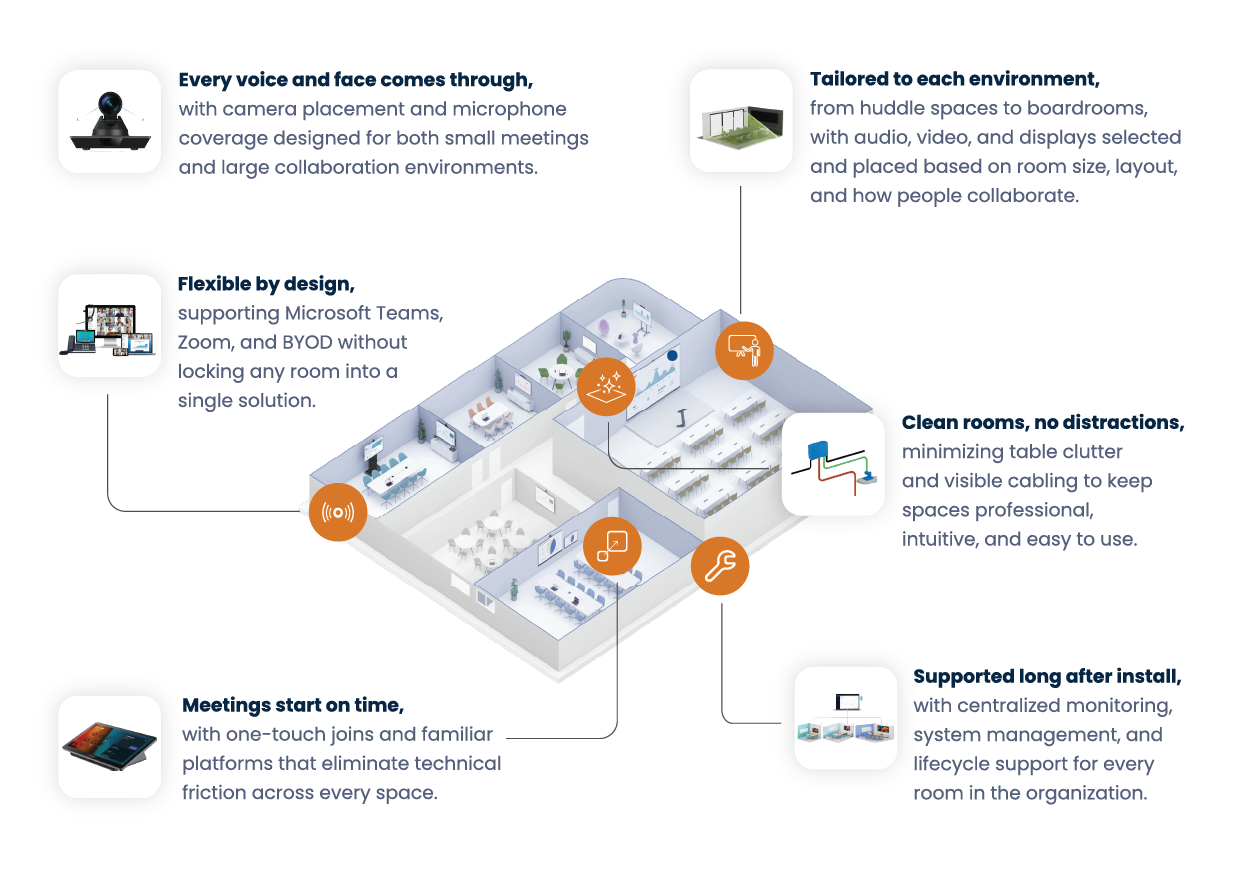
One of the biggest mistakes organizations make is buying hardware first. A great meeting room isn’t built from a shopping list of cameras and displays. Instead, it’s designed around how the space is actually used.
That means considering:
- Room size and shape
- Table layout
- Ceiling height and acoustics
- Lighting conditions
- Typical meeting size
- Hybrid vs in-person usage
From there, the right technology, whether interactive displays, collaboration boards, cameras, or microphones, can be selected to simplify setup and reduce cable clutter while giving teams a more intuitive way to share content.
A small huddle space needs very different audio and camera coverage than a 14-person boardroom or training room. Design for the environment first, then choose the equipment to match.
2. Remove friction so meetings start on time
Every extra step delays adoption. If users have to plug in multiple cables, switch inputs, download software, or call IT, they won’t use the room properly. Even small points of friction add up, and over time people start avoiding the room altogether or default to their laptops instead.
Modern conference rooms should feel simple and consistent from space to space, so anyone can walk in and start a meeting without thinking twice. Look for setups that support:
- One-touch meeting joins
- Consistent controls in every space
- Familiar platforms like Microsoft Teams or Zoom
- Simple “walk in and start” workflows
The goal is zero instructions. If someone needs training or a cheat sheet to launch a call, the technology is getting in the way instead of helping.
3. Design for hybrid meetings, not just the table
Today’s meetings are rarely fully in-person. Poor audio and awkward camera angles make remote participants feel disconnected, which leads to lower engagement and missed context.
To improve hybrid meeting performance:
Use full-room microphone coverage
Ceiling or beamforming mics capture everyone clearly, not just the person closest to the laptop. Professional-grade microphones and intelligent audio processing can dramatically improve clarity, especially in larger or acoustically challenging spaces.
Place cameras intentionally
Eye-level placement and wider framing help remote attendees see expressions and body language.
Avoid “end of the table” setups
If only one side of the room is visible, half the conversation gets lost. Everyone should feel equally present, whether they’re in the room or dialing in.
4. Stay platform flexible (Teams, Zoom, and BYOD)
Technology changes fast. Your rooms shouldn’t lock you into one ecosystem or require a full rebuild every time your collaboration tools evolve. The most effective conference room setups are platform-agnostic, giving teams the freedom to use the tools they already know and prefer.
Many organizations also pair their conference room technology with a unified communications platform so calling, chat, and meetings work seamlessly across locations and remote teams, creating one consistent experience whether someone is in the office or dialing in from home.
When evaluating meeting room AV solutions, look for support for:
- Microsoft Teams Rooms
- Zoom Rooms
- Bring Your Own Device (BYOD)
- Guest laptops
Flexibility keeps your investment future-proof and prevents expensive rework later.
5. Keep the room clean and intuitive
A clean space is easier to use. Visible wires, adapters, and extra gear create confusion and invite tampering. Well-designed conference rooms minimize table cables, extra remotes, loose accessories, and complicated controls. When everything has a place and nothing looks intimidating, adoption rises naturally.
6. Plan for monitoring and long-term support
Even the best-designed conference room fails without ongoing care. Think beyond installation and plan for centralized monitoring, remote troubleshooting, updates, and long-term lifecycle management. Without management, rooms slowly drift into “it usually works” territory, which users quickly stop trusting. Consistency builds confidence.
Quick conference room optimization checklist
If you want a simple gut check, most high-performing meeting spaces include:
- One-touch meeting start
- Clear audio for every seat
- Smart camera placement
- Support for Teams, Zoom, and BYOD
- Minimal cables and clutter
- Centralized management and support
If your rooms miss several of these, there’s likely room for improvement.
The bottom line
When conference rooms are thoughtfully designed, meetings start on time, hybrid teams collaborate naturally, IT tickets drop, and productivity goes up..
Looking to take the next step?
If you’re evaluating conference room technology or planning an upgrade, explore our Pro AV solutions or browse more of our Learning Center resources.